SDK 一键配置命令
Tina Linux SDK 提供 quick_config 功能,执行对应命令,可快速一键修改该功能相关的所有配置项。
备注
本文以 V821 作为示例,其余芯片平台使用方式与 V821 一致
:::
使用 quick_config
在 lunch 后, 输入 quick_config 命令回车:
$ quick_config
 _____     _     _   _____         ___ _
|     |_ _|_|___| |_|     |___ ___|  _|_|___
|  |  | | | |  _| '_|   --| . |   |  _| | . |
|__  _|___|_|___|_,_|_____|___|_|_|_| |_|_  |
   |__|                                 |___|

=============================================
 Quick Config ToolKit: Version 2.0.4
=============================================
Available Quick Config Name:

[CPUCFG]
    0 set_cpu_vf_0                              : Set cpu 960mhz (0.92v)
    1 set_cpu_vf_2                              : Set cpu 1200mhz (1.00v)
    2 config_v821                               : Set driver config for v821
    3 config_v821b                              : Set driver config for v821b
    4 config_v821_integrated_wifi               : Set wi-fi driver for v821
    5 config_v821b_integrated_wifi              : Set wi-fi driver for v821b

[DEBUG]
    6 disable_sdc0                              : Disable sdc0 for rtos uart pinmux
    7 debug_linux_function                      : Open kallsyms and debug_fs for kernel debug
    8 close_debug_linux_function                : Close kallsyms and debug_fs for kernel debug
    9 open_boot0_uart_print                     : Open boot0 uart print for debug
   10 open_linux_uart_print                     : Open linux uart print for debug
   11 open_rtos_uart_console                    : Open rtos uart for rtos debug
   12 open_all_uart_print                       : Open rtos boot0 linux uart for debug
   13 close_boot0_uart_print                    : Close boot0 uart print
   14 close_linux_uart_print                    : Close linux uart print
   15 close_rtos_uart_console                   : Close rtos uart console
   16 close_all_uart_print                      : Close rtos boot0 linux uart print

[KERNEL]
   17 kernel compression lzma                   : Set kernel compression method to lzma.
   18 kernel compression gzip                   : Set kernel compression method to gzip.
   19 kernel compression none                   : Set kernel compression method to none.

[MPP]
   20 mpp_compile_dynamic_lib                   : Set mpp compile dynamic lib for this board
   21 mpp_compile_static_lib                    : Set mpp compile static lib for this board
   22 de_resize_config                          : Open de resize function for person detection
   23 ve_freq_512M                              : Set ve freq to 512m for this board
   24 ipc_demo                                  : Enable ipc demo for this board
   25 cdr_demo                                  : Enable cdr demo for this board
   26 tuya_demo                                 : Enable tuya ipc demo
   27 keyword_spotting_demo                     : Enable keyword_spotting demo
   28 enable_uvc_and_demo                       : Enable uvc and demo

[SYSTEM]
   29 config_debug_baud_115200                  : Set debug serial baud to 115200
   30 config_debug_baud_1500000                 : Set debug serial baud to 1500000
   31 memory_optimization                       : Set memory optimization for kernel, will disable some less commonly used functions
   32 product_close_debug_config                : Close debug configs for mass production
   33 secure_firmware                           : Set to build secure firmware for this board

[TOOLCAHIN]
   34 musl_toolchain                            : Change this board cross toolchain to musl
   35 glibc_toolchain                           : Change this board cross toolchain to glibc

[WLAN]
   36 config_v821b_integrated_bluetooth         : Set integrated bluetooth configure, only enable ble-server role
   37 config_v821b_integrated_bluetooth_general : Set integrated bluetooth configure, enable ble-server and ble-client role
   38 config_v821b_integrated_bluetooth_full    : Set integrated bluetooth configure, enable ble all functions
   39 v821_smac                                 : Set v821 smac for this board
   40 disable_v821_integrated_wifi              : Set to disable v821 integrated wifi (for v821l2-xxx)
   41 v821_smac_etf                             : Set v821 smac_etf for this board
   42 v821_fmac_etf                             : Set v821 fmac_etf for this board
   43 v821_fmac_etf_on_ext                      : Set v821 fmac_etf for this board, compile as ko to external storage device
Which would you like?
- 输入
quick_config命令后,根据需要,选择上面序列号并回车,回车输入y(注意输入y后会修改本地环境的一些配置),就会自动修改相关配置文件,具体修改了哪些文件,执行y命令后会全部打印显示出来。请注意留意有些配置项输入y之后会提示一些额外操作,确保配置生效。 - 输入
quick_config命令后,若不需选择,直接回车即可,不会修改任何文件。 - 使用
quick_config命令配置后,这些改动是直接修改SDK中相关的文件,目前不支持清理命令。如果需要清理这些修改,需要手动使用git命令清理,或者根据quick_config命令执行后的提示,恢复相关的配置项。
quick_config 使用示例
切换板级摄像头到双目GC2083
更换摄像头模组为双目模组,可以使用 quick_config 修改配置到双目 GC2083 模组,输入 qucik_config 后可以看到选项 one_gc2083_sensor 编号为22,输入后即可切换配置。
Loading asciinema cast...
切换板级摄像头到双目GC2083
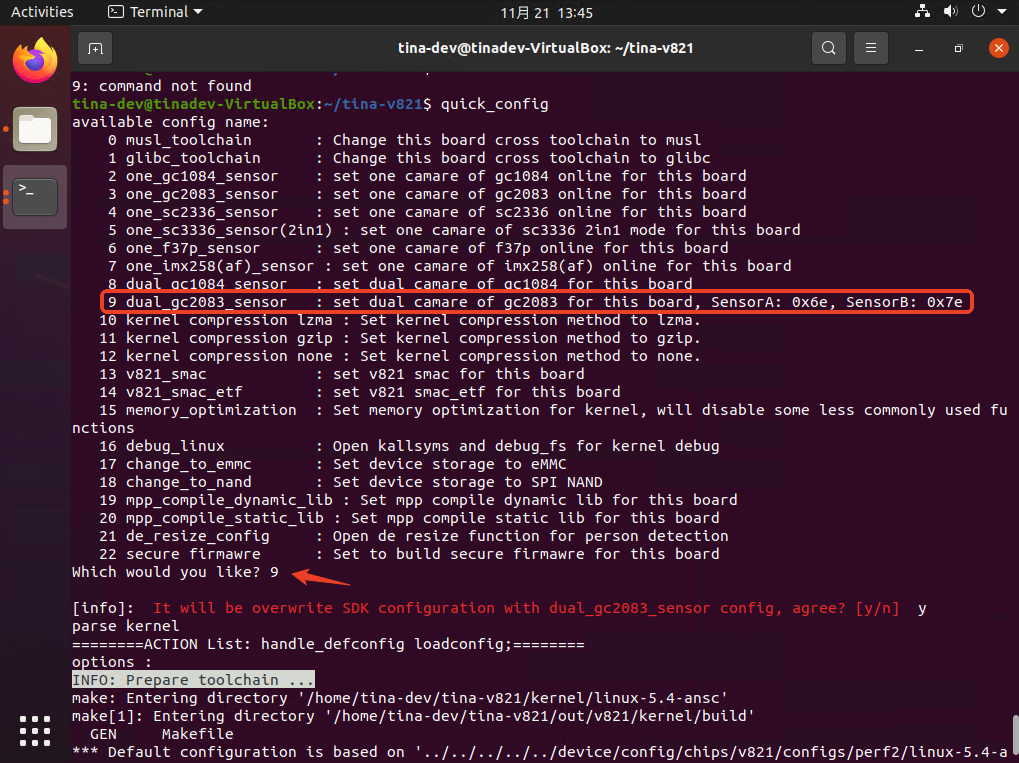
更换摄像头模组为双目模组,可以使用 quick_config 修改配置到双目 GC2083 模组,输入 qucik_config 后可以看到选项 dual_gc2083_sensor 编号为9,输入后即可切换配置。
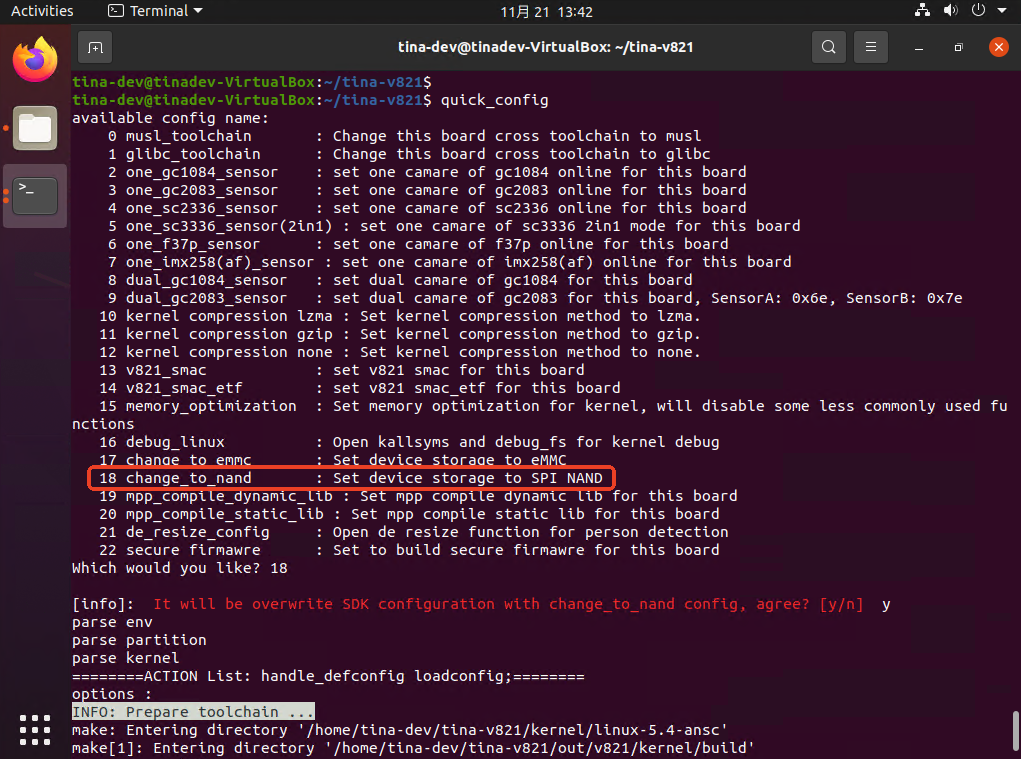
切换储存介质为 SPI NAND
切换储存器为NAND,输入 quick_config,可以看到用于切换的quick_config 是18,输入 18,之后会出现一个确认项,确认后将会自动执行其配置操作。
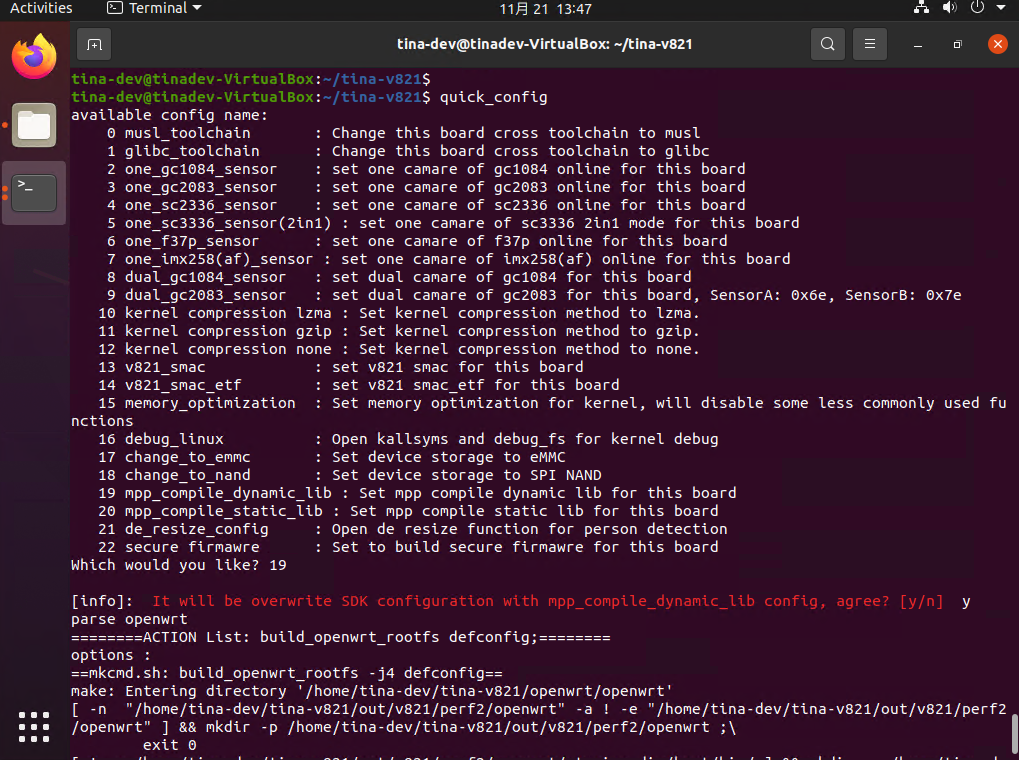
切换 MPP 为动态库编译
默认配置下,MPP 是静态库编译的,这里可以用 quick_config 切换到动态库编译。输入 quick_config 选择选项 19,然后确认
在切换后有提示,需要手动清除 mpp 的编译产物重新编译 mpp

切换工具链为glibc库
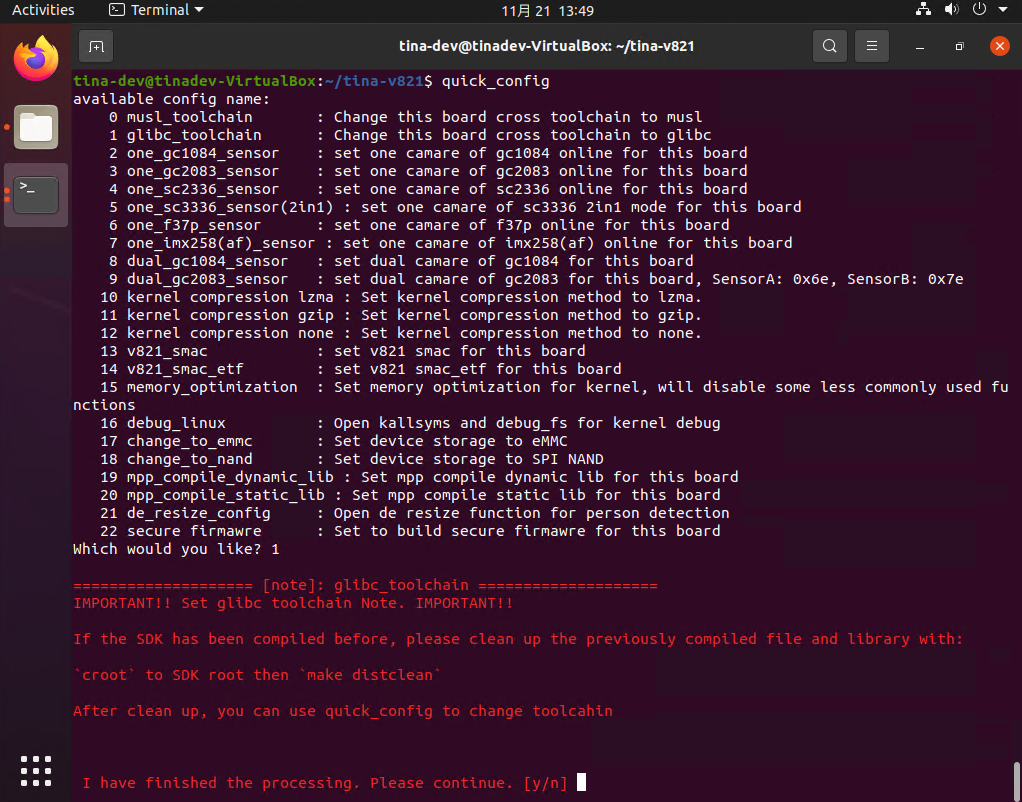
SDK 默认配置使用的库是 MUSL 库,可以通过 quick_config 切换到使用 glibc 库。输入 quick_config 然后选择选项。
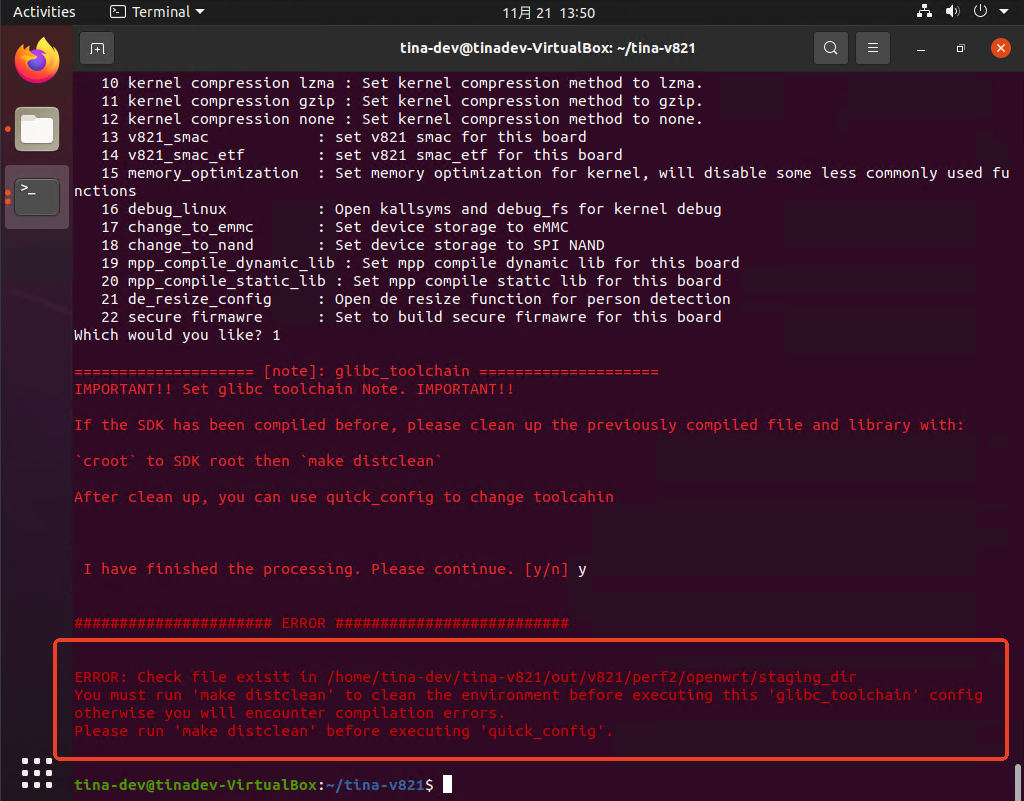
注意部分 quick_config 在执行前需要有其他的操作,请按照提示进行操作,例如切换工具链,会有如下提示。如果没按照要求执行可能会导致SDK无法编译通过,quick_config 也对部分文件做了检查,如果无视提示直接跳过,会直接报错。
例如这里,SDK 提示需要删除编译产物,需要手动执行 make distclean 然后再执行切换工具链的操作。
如果无视,没有执行清理编译产物的操作,则报错退出
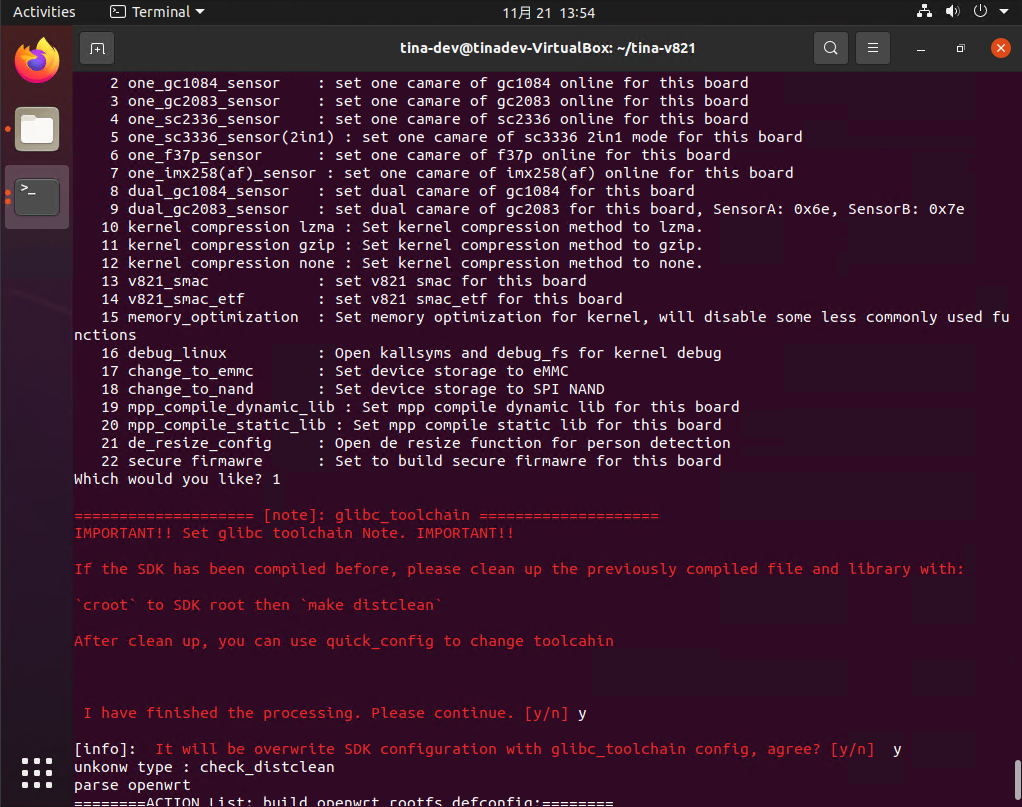
执行了 make distclean 后,正常操作
Quick Config 使用说明
整体框架
quick_conf  test
|--- 找到 quick_config.json,并解析
    |--- 修改内核           ---> 引入fragment
        |--- ${TINA_TOPDIR}/build.sh loadconfig lock_defconfig.fragment
        |--- ${TINA_TOPDIR}/build.sh saveconfig
    |--- 修改uboot的配置
        |--- 修改 board.dts         ---> 脚本处理
    |--- 修改 boot_package_nor.fex  ---> 脚本处理
    |--- 修改 sys_config.cfg        ---> 脚本处理
    |--- 修改 uboot-board.dts       ---> 脚本处理
    |--- 修改 env.dts       		  ---> 脚本处理
    |--- 修改 tina defconfig		  ---> 脚本处理
脚本框架
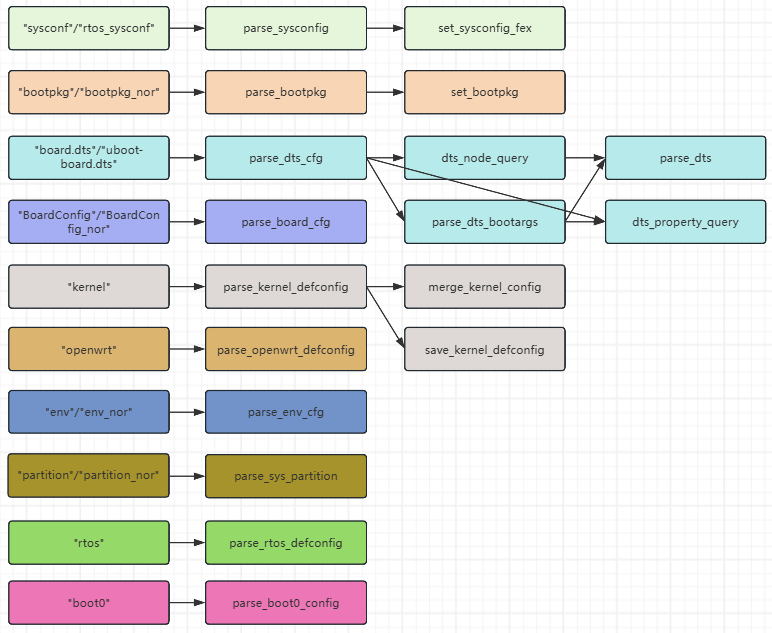
使用方法
usage: quick_config [-h] [-c [CONFIG]] [-f] [-i [INCLUDE]] [-gd] buildconfig

positional arguments:
  buildconfig           the buildconfig file

optional arguments:
  -h, --help            show this help message and exit
  -c [CONFIG], --config [CONFIG]
                        configuration items that need to be loaded (optional)
  -f, --force           force exec quick config item, no check, use at your own risk
  -i [INCLUDE], --include [INCLUDE]
                        include quick_config config file in default/quick_config
  -gd, --gen_dts_base   generate quick_config base with given dts node
注意事项
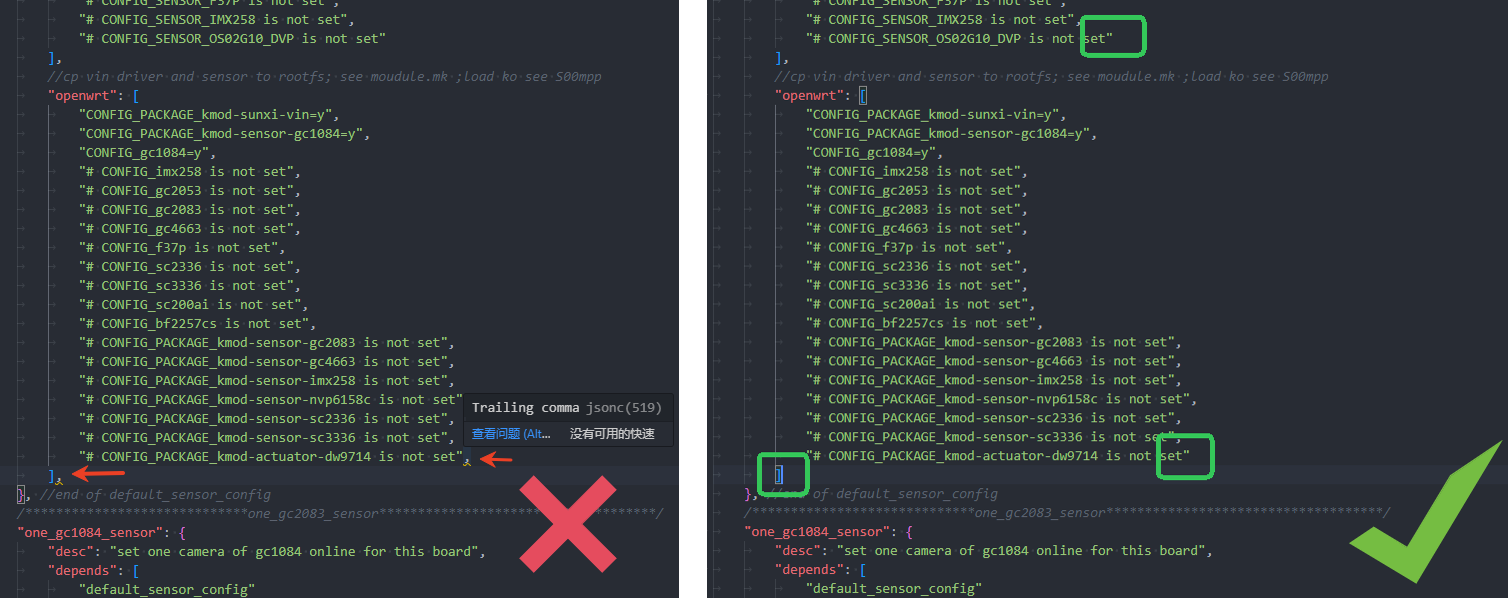
在 JSON 对象 中,元素是以键值对的形式表示的,每个键值对之间使用逗号分隔。最后一个键值对后不加逗号, JSON 规范规定不能在对象的结尾处使用多余的逗号。
在 JSON 数组 中,数组的元素之间用逗号分隔,最后一个元素后也不加逗号。
如果在最后一项后加逗号,可能导致解析错误,特别是在不同语言或工具中处理时。因此,为了确保 JSON 数据的有效性和跨平台的兼容性,最后一项后不加逗号是必须遵守的规范。
在VSCode中,错误使用逗号会显示警告 Trailing comma
同名配置项覆盖逻辑
以 V821-PERF2 板级为例,其配置参数如下:
{
    "use_common_config": true,
    "quick_config_include": [
        "perf2_sensor.json",
        "storage_change.json"
    ],
}
则覆盖逻辑如下所示:
device/config/chips/v821/configs/default/quick_config.json                         // common_conifg 平台共用配置文件
    ↑ 同 key 覆盖
    device/config/chips/v821/configs/default/quick_config/perf2_sensor.json        // perf2 板级 sensor 通用配置文件
        ↑ 同 key 覆盖
        device/config/chips/v821/configs/default/quick_config/storage_change.json // 介质切换配置文件
            ↑ 同 key 覆盖
            device/config/chips/v821/configs/perf2/quick_config.json             // v821-perf2 板级配置文件
提示
这里的覆盖是完整的整个配置的覆盖,例如在 device/config/chips/v821/configs/default/quick_config.json 中有如下配置
"config_debug_baud_115200": {
	"desc": "Set debug serial baud to 115200",
	"boot0": {
		"common.mk": {
			"CFG_UART_BAUD_1500000": null
		}
	},
	"env": [
		{
			"name": "console",
			"val": "ttyS0,115200",
			"method": "add"
		}
	],
	"board.dts": {
		"bootargs": {
			"console": "ttyS0,115200"
		}
	}
}
在 device/config/chips/v821/configs/default/quick_config/perf2_sensor.json 中有如下配置:
"config_debug_baud_115200": {
	"desc": "Set debug serial baud to 115200",
	"boot0": {
		"common.mk": {
			"CFG_UART_BAUD_1500000": "115200"
		}
	},
}
在 device/config/chips/v821/configs/perf2/quick_config.json 中有如下配置
"config_debug_baud_115200": {
	"desc": "Set debug serial baud to 115200",
	"board.dts": {
		"bootargs": {
			"console": "ttyS3,115200"
		}
	}
}
那么最终执行的配置文件将会是 device/config/chips/v821/configs/perf2/quick_config.json 中的配置
"config_debug_baud_115200": {
	"desc": "Set debug serial baud to 115200",
	"board.dts": {
		"bootargs": {
			"console": "ttyS3,115200"
		}
	}
}
之前的配置将被完整的覆盖,不会因为只配置了一部分差异点而差异化覆盖。
不会有如下执行逻辑:
- 先去执行
device/config/chips/v821/configs/default/quick_config.json - 再去执行
device/config/chips/v821/configs/perf2/quick_config.json - 最后去执行
device/config/chips/v821/configs/perf2/quick_config.json
而是直接执行:
device/config/chips/v821/configs/perf2/quick_config.json中的配置。
这样设计主要为了降低 quick_config 框架的维护难度。
所以当使用覆盖逻辑的时候,请使用完整的配置实现,包括板级差异化的和板级非差异化的部分。
信息
如果希望使用先执行 xxx 再执行 xxx 的方式,请创建两个不同名称的 quick_config,使用 depends 方式引用,此时将会先执行 depends 中的配置,例如:
{
    "config_debug_baud_115200": {
        "desc": "Set debug serial baud to 115200",
        "boot0": {
            "common.mk": {
                "CFG_UART_BAUD_1500000": null
            }
        },
        "env": [
            {
                "name": "console",
                "val": "ttyS0,115200",
                "method": "add"
            }
        ],
        "board.dts": {
            "bootargs": {
                "console": "ttyS0,115200"
            }
        }
    }
    "config_debug_baud_115200_for_myboard": {
        "desc": "Set debug serial baud to 115200",
    	"depends" : [
            "config_debug_baud_115200"
        ]
        "board.dts": {
            "bootargs": {
                "console": "ttyS3,115200"
            }
        }
    }
}
此时执行 quick_config config_debug_baud_115200_for_myboard 的时候,将会先去执行 config_debug_baud_115200 中的配置,再去执行 config_debug_baud_115200_for_myboard 中的配置。以达到差异化修改的目的。
:::
:::
:::
Quick Config 文件格式
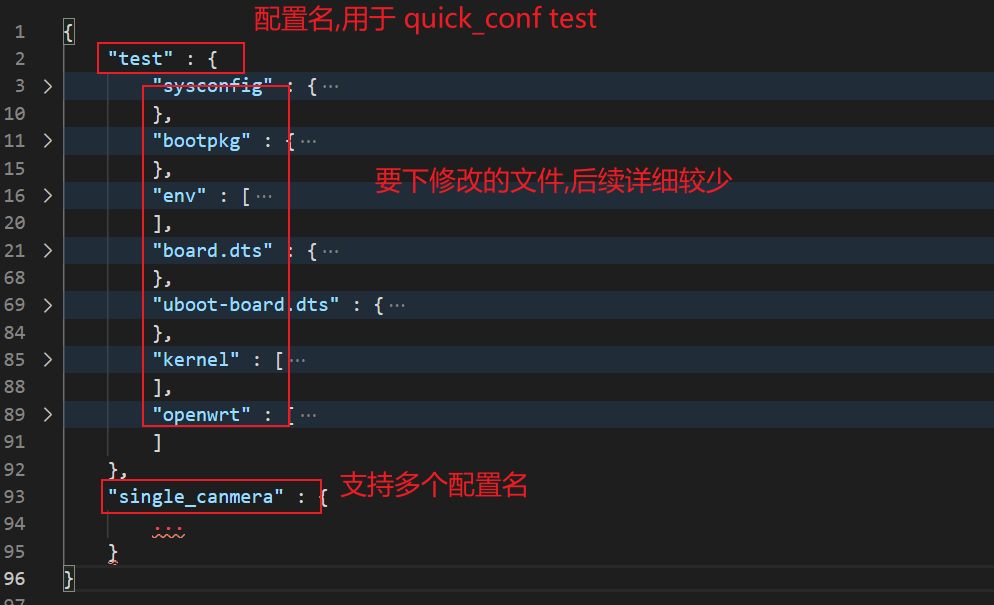
例子:
{
    "use_common_config": true,
    "quick_config_include": [
        "fastboot_common.json",
        "fastboot_storage_change.json"
    ],
    "test" : {
        "sysconfig" : {
            "target" : {
                "storage_type" : 1
            },
            "product" : {
                "version" : "\"101\""
            }
        },
        "bootpkg" : {
            "logo" : "test.bmp.lzma",
            "logo-enable" : 1,
            "logo-addsuffix" : ".lz4"
        },
        "env" : [
            { "name" : "wifi_mac", "val": "1.2.3.4", "method" : "add" },
            { "name" : "setargs_mmc", "val": " test=true", "method" : "append" },
            { "name" : "bt_mac", "method" : "del" }
        ],
        "board.dts" : {
            "add_node" : [
                { "name": "node0" },
                { "path" : "/", "name": "node1", "add_tail" : 1 },
                { "path" : "node0/", "name": "test0" },
                { "path" : "node1", "name": "test0" },
                { "path" : "node0/test0", "name": "test1" },
                { "path" : "node0//test0", "name": "test2" },
                { "path" : "node0/test0", "name": "test3" },
                { "path" : "node0/test0", "name": "test4" },
                { "path" : "node1/test0", "name": "test1" },
                { "path" : "node1/test0", "name": "test_label: test2" },
                { "path" : "node1/test0", "name": "test3" }
            ],
            "del_node" : [
                { "path" : "node0/test0", "name": "test2" },
                { "path" : "node1/test0", "name": "test3" }
            ],
            "set_property" : {
                "node0" : {
                    "compatible" : "\"node0\",\"Tina\"",
                    "status" : "\"okay\""
                },
                "node1" : {
                    "compatible" : "\"node1\",\"Tina\"",
                    "status" : "\"okay\""
                },
                "node0/test0" : {
                    "reg" : "<xxxxxxx>"
                },
                "test1" : {
                    "status" : "\"okay\""
                },
                "test4" : {
                    "tast-bool" : null,
                    "will_del" : null,
                    "status" : "\"okay\""
                },
                "test_label" : {
                    "status" : "\"okay\""
                }
            },
            "del_property" : {
                "test4" : {
                    "will_del" : null
                }
            }
        },
        "uboot-board.dts" : {
            "add_node" : [
                { "name": "&sunxi_flashmap" },
                { "path" : "sunxi_flashmap", "name": "nor_map" }
            ],
            "set_property" : {
                "nor_map" : {
                    "logic_offset" : "<4352>",
                    "boot_param_start" : "<248>",
                    "boot_param_size" : "<8>",
                    "uboot_start" : "<256>",
                    "uboot_size" : "<4096>",
                    "status" : "\"okay\""
                }
            }
        },
        "kernel" : [
            "lock_defconfig.fragment", "ftrace_defconfig.fragment",
            "# CONFIG_AW_GPADC is not set", "CONFIG_LOG_BUF_SHIFT=15"
        ],
        "openwrt" : [
            "CONFIG_TARGET_PREINIT_IP=\"192.168.1.2\"", "# CONFIG_HAS_FPU is not set"
        ]
    }
}
内置参数
use_common_config
使用平台共有 quick_config 配置,路径: default/quick_config.json 这份配置为最基础配置,会被每一级的相同 Key 的配置完整覆盖(不是差异化覆盖)
例子:
{
    "use_common_config": true,  // 启用平台共有 quick_config 配置
}
{
    "use_common_config": false,  // 禁用平台共有 quick_config 配置
}
备注
在早期版本 QuickConfig 2.0.3 之前,这个配置被错误拼写为 use_common_conifg,工具做了兼容处理,优先解析 use_common_config 如果解析失败再去解析 use_common_conifg,后续请使用 use_common_config
:::
quick_config_include
quick_config 引用配置,共用配置减少代码维护量。其会去平台路径下 default/quick_config 文件夹中寻找对应配置文件名
其内容层级比 default/quick_config.json 高,会覆盖 default/quick_config.json 中的相同 key 的配置
{
    "quick_config_include": [
        "fastboot_common.json",         // 引用 fastboot_common.json
        "fastboot_storage_change.json"  // 引用 fastboot_storage_change.json
    ],
}
desc
用于用户不带参数调用 quick_config 时,简要说明配置项的功能。
{
    "config1" : {
        "desc" : "config1"
        ....
    },
    "config2" : {
        "desc" : "config2"
        ....
    },
}
depends
用于加载其余所依赖的配置项,可以多层引用。
{
    "env_init_for_all" : {
        ...
    }
    "all" : {
        "depends" : [
            "env_init_for_all", xxxx		# 加载all时会先加载env配置项
        ]
    }
}
注意
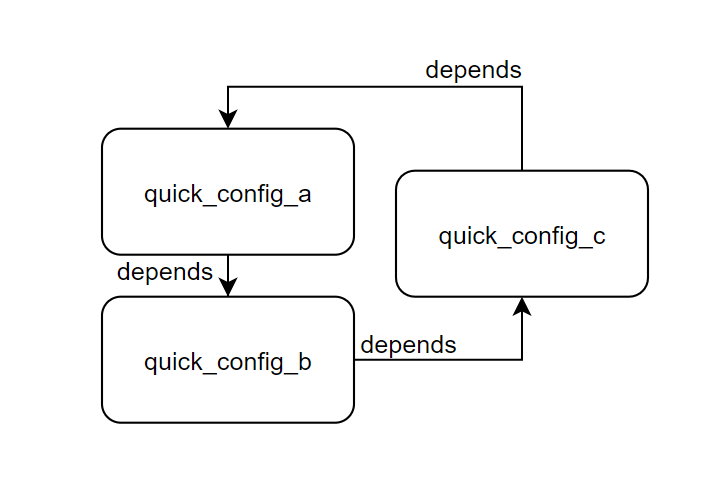
quick_config 未限制循环引用,所以当出现如下引用逻辑时,quick_config 将无限运行下去
:::
cmd
用于执行一些 sh 命令(可以使用根目录下的 .buildconfig 里的环境变量)
提示
注意破坏性命令执行!
:::
{
    "cmd" : [
        "mkdir -p ${LICHEE_PLAT_OUT}/ota_sdnand",
        ...
    ]
}
internal
内置命令,用于给其他配置 depends 依赖使用,直接调用的时候会提示 [error]: This is internal use quick_config, please do not use it directly!

{
    "internal": true,
}
tag
内置命令,用于给配置分类
{
    "tag": "system",
}
sync_env
内置命令,用于帮助用户同步当前板级配置,方便完成后不需要再次执行 source build/envsetup.sh && lunch 所带来的麻烦。
提示
这个命令请在 quick_config 的末尾执行
:::
{
    "sync_env": true,
}
sysconfig
作用于 BOOT0 配置文件:sys_config.fex
在 sys_config.fex 配置文件中,配置主要是通过键值对的方式来设置系统的相关参数。每个配置项通常由一个 mainkey 作为主键,以及一个或多个 subkey 子项和相应的值 val。
配置规则:
- mainkey:主键,用来定义某个大的配置项。
- subkey:子键,表示
mainkey下的具体配置项。 - val:具体的值,对于字符串类型的值需要加上
\"来表示。
target — 存储类型配置
- storage_type:指定存储类型。例如,
storage_type: 1可能代表某种特定的存储介质或格式。
product — 产品信息配置
- version:表示产品的版本号,版本号通常是字符串类型,因此需要加上
\"。
示例配置解释:
"sysconfig" : {
    "target" : {
        "storage_type" : 1  // 设置存储类型为1
    },
    "product" : {
        "version" : "\"101\""  // 设置产品版本为"101"
    }
},
target.storage_type被设置为1,这可能是指定存储介质的类型。product.version被设置为字符串"101",表示产品的版本信息。
rtos_sysconfig
作用于 RTOS 配置文件:sys_config.fex
- mainkey:主键,用来定义某个大的配置项。
- subkey:子键,表示
mainkey下的具体配置项。 - val:具体的值,对于字符串类型的值需要加上
\"来表示。
"rtos_sysconfig" : {
    /*
    * 规则:
    *   "mainkey" : {
    *       "subkey" : val   重新设置val,字符串需要添加\"str\"
    *    }
    */
}
示例:
"rtos_sysconfig": {
	"vind/sensor0": {
		"sensor0_mname": "\"gc1084_mipi\""
	},
	"vind/vinc0": {
		"vinc0_mipi_num": "1"
	},
	"vind/vinc4": {
		"vinc4_mipi_num": "1"
	}
},
partition
作用于非 NOR 存储介质分区表文件:sys_partition.fex,在 sys_partition.fex 文件中,分区配置用于定义非 NOR 存储介质的分区表。每个分区通常包含分区名、大小、属性等信息,可以通过配置文件来增加、修改或删除分区。
配置规则:
- name:分区的名称,必须唯一。
- 属性:不同的分区可能有不同的属性(例如
size、user_type、downloadfile等),具体属性视分区类型和系统需求而定。 - del:如果配置项包含
del: true,则表示删除该分区。
示例配置解释:
"partition" : [
    { "name" : "inster_last", "size" : "1234" },  // 新增分区 "inster_last",大小为 1234
    { "name" : "inster_last2", "size" : "1234" }, // 新增分区 "inster_last2",大小为 1234
    { "name" : "mbr", "size" : "32768" }, // 新增分区 "mbr",大小为 32768
    { "name" : "env-redund", "size" : "12345", "user_type" : "0x123" }, // 新增分区 "env-redund",大小为 12345,用户类型为 0x123
    { "name" : "mbr" }, // 用于定位分区 "mbr" 在表中的位置
    { "name" : "inster_after_mbr", "size" : "45678", "user_type" : "0x456", "downloadfile" : "\"test\"" }, // 新增分区 "inster_after_mbr",大小为 45678,用户类型为 0x456,指定下载文件为 "test"
    { "name" : "rootfs", "size" : "45678", "user_type" : "0x456", "test" : "12" }, // 新增分区 "rootfs",大小为 45678,用户类型为 0x456,附加属性 "test" 为 12
    { "name" : "inster_last1", "del" : true } // 删除分区 "inster_last1"
]
新增分区
每个分区都有名称 name 和不同的属性,常见的属性包括:
size:分区的大小,单位通常为字节或其他存储单位。user_type:用户自定义的类型标识,用于标识特定类型的分区。downloadfile:如果分区用于存储某些文件,可以指定下载的文件名称。test:其他可自定义的属性。
修改分区属性
size:分区的大小,单位通常为字节或其他存储单位。user_type:用户自定义的类型标识,用于标识特定类型的分区。downloadfile:如果分区用于存储某些文件,可以指定下载的文件名称。test:其他可自定义的属性。
删除分区
- 使用
"del": true标识要删除的分区。删除时,系统将不再使用该分区。
分区定位
name为mbr的分区表示分区表中的位置标识符,通常用于定位其他分区的位置,确定其他分区在该分区表中的相对位置。
增量添加分区
- 配置项支持在已有分区后面添加新的分区,例如
inster_after_mbr,表示此分区将添加到mbr之后。
partition_nor
作用于 NOR 存储介质分区表文件:sys_partition_nor.fex,在 sys_partition_nor.fex 文件中,分区配置用于定义 NOR 存储介质的分区表。每个分区通常包含分区名、大小、属性等信息,可以通过配置文件来增加、修改或删除分区。
配置规则:
- name:分区的名称,必须唯一。
- 属性:不同的分区可能有不同的属性(例如
size、user_type、downloadfile等),具体属性视分区类型和系统需求而定。 - del:如果配置项包含
del: true,则表示删除该分区。
示例配置解释:
"partition" : [
    { "name" : "inster_last", "size" : "1234" },  // 新增分区 "inster_last",大小为 1234
    { "name" : "inster_last2", "size" : "1234" }, // 新增分区 "inster_last2",大小为 1234
    { "name" : "mbr", "size" : "32768" }, // 新增分区 "mbr",大小为 32768
    { "name" : "env-redund", "size" : "12345", "user_type" : "0x123" }, // 新增分区 "env-redund",大小为 12345,用户类型为 0x123
    { "name" : "mbr" }, // 用于定位分区 "mbr" 在表中的位置
    { "name" : "inster_after_mbr", "size" : "45678", "user_type" : "0x456", "downloadfile" : "\"test\"" }, // 新增分区 "inster_after_mbr",大小为 45678,用户类型为 0x456,指定下载文件为 "test"
    { "name" : "rootfs", "size" : "45678", "user_type" : "0x456", "test" : "12" }, // 新增分区 "rootfs",大小为 45678,用户类型为 0x456,附加属性 "test" 为 12
    { "name" : "inster_last1", "del" : true } // 删除分区 "inster_last1"
]
新增分区
每个分区都有名称 name 和不同的属性,常见的属性包括:
size:分区的大小,单位通常为字节或其他存储单位。user_type:用户自定义的类型标识,用于标识特定类型的分区。downloadfile:如果分区用于存储某些文件,可以指定下载的文件名称。test:其他可自定义的属性。
修改分区属性
size:分区的大小,单位通常为字节或其他存储单位。user_type:用户自定义的类型标识,用于标识特定类型的分区。downloadfile:如果分区用于存储某些文件,可以指定下载的文件名称。test:其他可自定义的属性。
删除分区
- 使用
"del": true标识要删除的分区。删除时,系统将不再使用该分区。
分区定位
name为mbr的分区表示分区表中的位置标识符,通常用于定位其他分区的位置,确定其他分区在该分区表中的相对位置。
增量添加分区
- 配置项支持在已有分区后面添加新的分区,例如
inster_after_mbr,表示此分区将添加到mbr之后。
bootpkg
作用于 boot_package.cfg 的 boot_package 打包配置文件。
在 boot_package.cfg 中,bootpkg 配置文件用于管理和打包不同的启动项和资源(如 U-Boot、logo 等)。每个配置项的设置会控制是否包含某个项目,并且可以使用特定的后缀(如 .ga 或 .lzma)对项进行压缩。
配置规则:
-
item_name-enable: 用来启用或禁用某个项。通常设置为0或1,其中:1表示启用该项。0表示禁用该项,即相当于注释掉该项。
-
后缀:如果配置的值是特定的后缀(如
.gz或.lzma),则会自动在该项后面添加压缩类型的后缀。.gz会给项添加-gzip后缀。.lzma会给项添加-lzma后缀。.lz4会给项添加-lz4后缀。
配置示例解释:
示例 1:
"bootpkg" : {
    "logo" : "test.bmp.lzma",  // 设置 logo 项,使用 LZMA 压缩
    "logo-enable" : 1,         // 启用 logo 项
},
- "logo" 设置为
"test.bmp.lzma",表示 logo 文件名为test.bmp,并且使用 LZMA 压缩(后缀.lzma)。 - "logo-enable" 设置为
1,表示启用该项,即在打包时包含 logo。
示例 2:
"bootpkg" : {
    "u-boot" : 1,  // 启用 U-Boot 项
    "logo" : 0,    // 禁用 logo 项
}
- "u-boot" 设置为
1,表示启用 U-Boot 项。 - "logo" 设置为
0,表示禁用 logo 项,即在打包时不包含 logo。
示例 3:
"bootpkg" : {
    "kernel" : "kernel.img.gz",  // 设置 kernel 文件,使用 Gzip 压缩
    "kernel-enable" : 1,         // 启用 kernel 项
}
- "kernel" 设置为
"kernel.img.gz",表示内核文件使用 Gzip 压缩。 - "kernel-enable" 设置为
1,表示启用该项。
bootpkg_nor
作用于 boot_package_nor.cfg 的 boot_package 打包配置文件。
在 boot_package_nor.cfg 中,bootpkg 配置文件用于管理和打包不同的启动项和资源(如 U-Boot、logo 等)。每个配置项的设置会控制是否包含某个项目,并且可以使用特定的后缀(如 .ga 或 .lzma)对项进行压缩。
配置规则:
-
item_name-enable: 用来启用或禁用某个项。通常设置为0或1,其中:1表示启用该项。0表示禁用该项,即相当于注释掉该项。
-
后缀:如果配置的值是特定的后缀(如
.gz或.lzma),则会自动在该项后面添加压缩类型的后缀。.gz会给项添加-gzip后缀。.lzma会给项添加-lzma后缀。.lz4会给项添加-lz4后缀。
配置示例解释:
示例 1:
"bootpkg" : {
    "logo" : "test.bmp.lzma",  // 设置 logo 项,使用 LZMA 压缩
    "logo-enable" : 1,         // 启用 logo 项
},
- "logo" 设置为
"test.bmp.lzma",表示 logo 文件名为test.bmp,并且使用 LZMA 压缩(后缀.lzma)。 - "logo-enable" 设置为
1,表示启用该项,即在打包时包含 logo。
示例 2:
"bootpkg" : {
    "u-boot" : 1,  // 启用 U-Boot 项
    "logo" : 0,    // 禁用 logo 项
}
- "u-boot" 设置为
1,表示启用 U-Boot 项。 - "logo" 设置为
0,表示禁用 logo 项,即在打包时不包含 logo。
示例 3:
"bootpkg" : {
    "kernel" : "kernel.img.gz",  // 设置 kernel 文件,使用 Gzip 压缩
    "kernel-enable" : 1,         // 启用 kernel 项
}
- "kernel" 设置为
"kernel.img.gz",表示内核文件使用 Gzip 压缩。 - "kernel-enable" 设置为
1,表示启用该项。
env
作用于 env.cfg ,env 配置文件
"env" : [
    /*
    * 规则:
    *   { "name" : "wifi_mac", "val": "1.2.3.4", "method" : "add" },
    *   { "name" : "setargs_mmc", "val": " test=true", "method" : "append" },
    *   { "name" : "bt_mac", "method" : "del" }
    *	PS: method目前只支持 add,append,del
    */
    { "name" : "wifi_mac", "val": "1.2.3.4", "method" : "add" },
    { "name" : "setargs_mmc", "val": " test=true", "method" : "append" },
]
示例:
"env" : [
    { "name" : "wifi_mac", "val": "1.2.3.4", "method" : "add" },
    { "name" : "setargs_mmc", "val": " test=true", "method" : "append" },
    { "name" : "bt_mac", "method" : "del" }
],
board.dts
作用于 board.dts 内核设备树配置文件,其配置方式如下所示
add_node — 添加节点
此部分用于向设备树中添加新节点。每个节点都可以定义路径、节点名,以及是否需要添加到指定路径的尾部。
- name:新节点的名称
- path:节点的父路径,支持可选。如果没有指定路径,则会添加到根节点。
- add_tail:是否在指定路径的尾部插入新节点,布尔值(
true为在尾部插入,false为默认插入)。
示例:
"add_node": [
    { "name": "node0" },
    { "path": "/", "name": "node1", "add_tail": true },
    { "path": "spi0", "name": "node1", "add_tail": true }
]
- 执行:
"add_node": [
    { "name": "node0" }
]
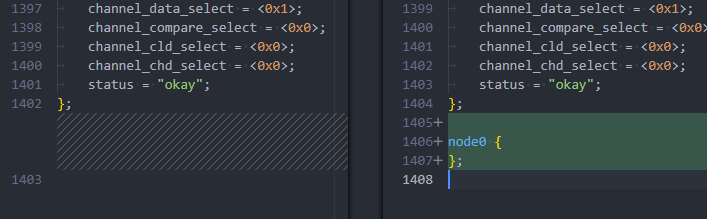
- 执行:
"add_node": [
    { "path": "/", "name": "node1", "add_tail": true }
]
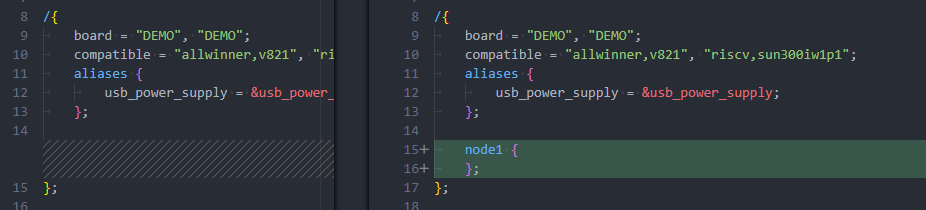
- 执行:
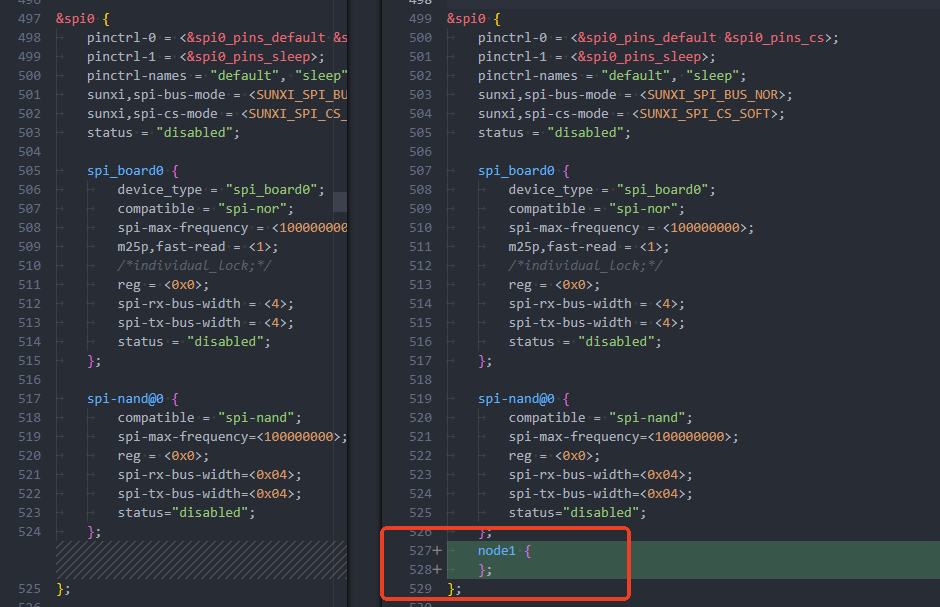
"add_node": [
    { "path": "spi0", "name": "node1", "add_tail": true }
]
提示
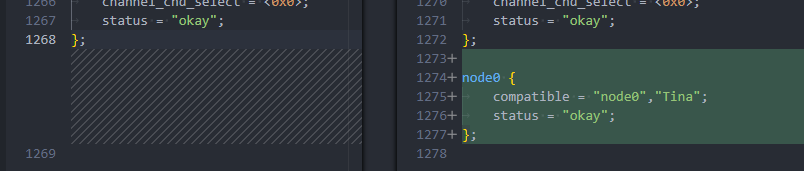
add_node 只能增加节点,如果需要增加属性请配合 set_property 方式使用,例如:
{
    "add_node": [
        { "name": "node0" }
    ],
    "set_property": {
        "node0": {
            "compatible": "\"node0\",\"Tina\"",
            "status": "\"okay\""
        }
    }
}
:::
del_node — 删除节点
此部分用于从设备树中删除指定的节点。需要指定要删除节点的路径和名称。
- path:要删除节点的父路径,可选。
- name:要删除的节点名。
示例:
"del_node": [
    { "name": "node0" },
    { "path": "/", "name": "node1" },
    { "path": "spi0", "name": "node1" }
]
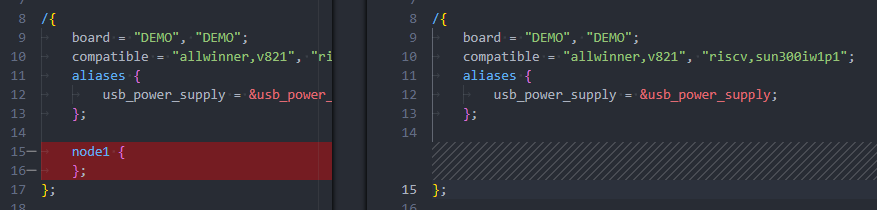
- 执行:
"del_node": [
    { "name": "node0" }
]
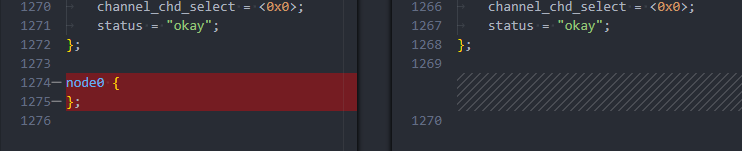
- 执行:
"del_node": [
    { "path": "/", "name": "node1" }
]
- 执行:
"del_node": [
    { "path": "spi0", "name": "node1" }
]
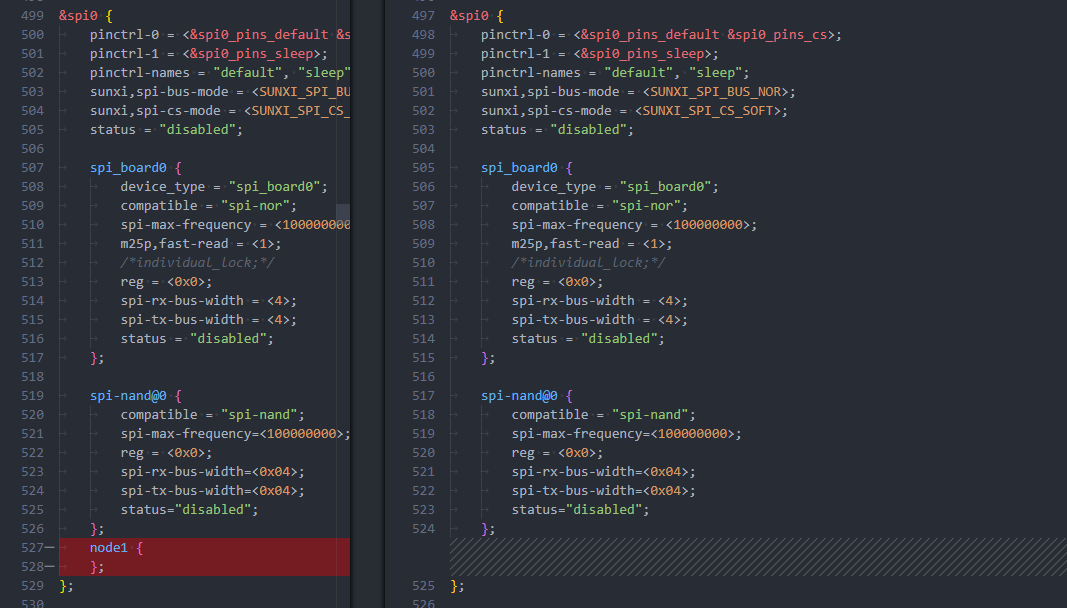
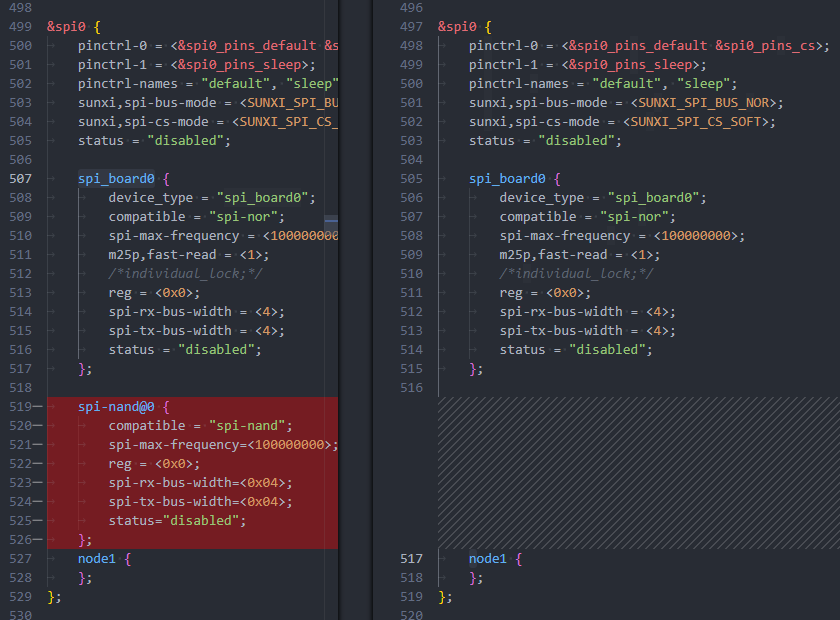
信息
可以用于直接删除整个节点和属性
"del_node": [
    {
        "path": "spi0",
        "name": "spi-nand@0"
    }
]
:::
set_property — 设置节点属性
此部分用于设置节点的属性。每个节点可以有多个属性,设置时需要指定节点名称和要添加的属性。如果不存在属性则会在末尾添加属性。
- 节点名:需要设置属性的节点名。
- 属性名称:要设置的属性。
- 属性值:对应的属性值。
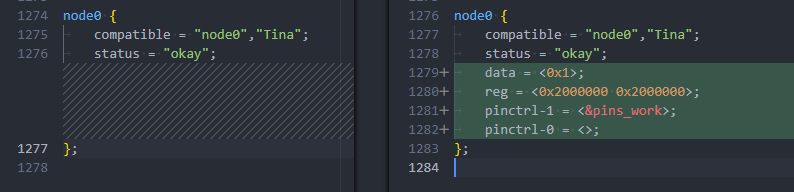
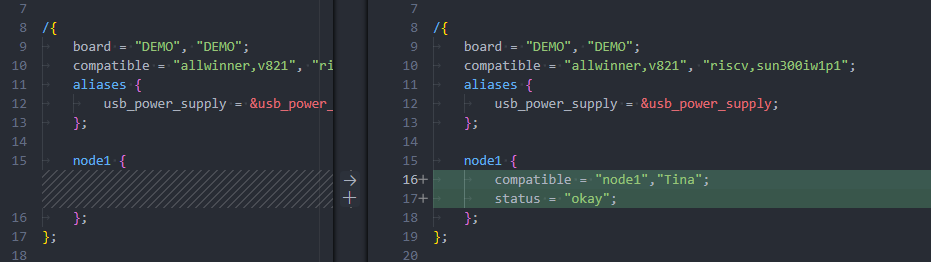
示例:
"set_property": {
    "node0": {
        "compatible": "\"node0\",\"Tina\"",
        "data": "<0x1>",
        "reg": "<0x2000000 0x2000000>",
        "pinctrl-1": "<&pins_work>",
        "pinctrl-0": "<>",
        "status": "\"okay\""
    },
    "node1": {
        "compatible": "\"node1\",\"Tina\"",
        "status": "\"okay\""
    }
}
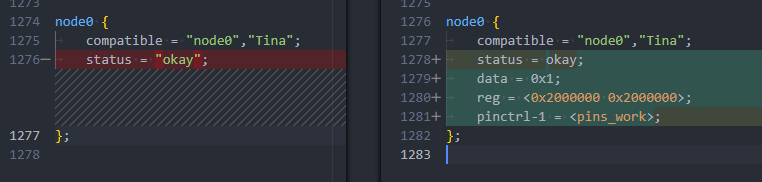
设备树变化如下
node0变化如下
node1变化如下
提示
这里是直接字符串替换内容,请注意保留设备树相关符号,否则设备树会替换出非法内容
"set_property": {
    "node0": {
        "data": "0x1",                    # 不加 < >
        "pinctrl-1": "<pins_work>",       # 没有引用
        "status": "okay                   # 没有转义 ""
    },
}
:::
set_property_with_address — 设置节点属性并根据 reg 配置节点地址
此部分用于设置节点的属性。每个节点可以有多个属性,设置时需要指定节点名称和要添加的属性。如果不存在属性则会在末尾添加属性。一般用于配置预留内存范围。
- 节点名:需要设置属性的节点名。
- 属性名称:要设置的属性。
- 属性值:对应的属性值。
示例:
"set_property_with_address": {
	"reserved_ram": {
		"reg": "<0x0 0x41000000 0x0 0x400000>"
	}
}
设备树变化如下
reserved_ram变化如下

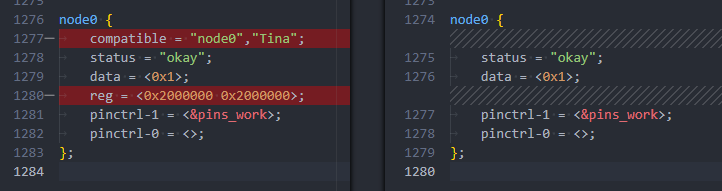
del_property — 删除节点属性
此部分用于删除节点的属性。删除时指定节点名和要删除的属性名称。
- 节点名:要删除属性的节点名。
- 属性名称:要删除的属性名称。
示例:
"del_property": {
    "node0": {
        "compatible": null,
        "reg": null
    },
}
bootargs — 修改启动参数
此部分用于修改启动时传递的内核参数。可以新增、修改或删除参数。如果设备树不存在 bootargs 节点则会跳过。
- key:参数的名称(如
loglevel、rootwait)。 - value:参数的值。如果值为
null,则表示删除该参数。
示例:
"bootargs": {
    "loglevel": 8,  // 修改 loglevel 参数
    "rootwait": null // 删除 rootwait 参数
}
add_prefix — 添加属性前缀
此部分用于给某些节点的属性添加前缀。可以对已有的节点属性进行修改,通常用于/delete-property/ 和 /delete-node/。
- 节点名:需要修改的节点。
- 属性名称:需要添加前缀的属性。
- 值:指定添加的前缀。
示例:
"add_prefix": {
    "gmac0_phy0": {
        "reset-gpios": "/delete-property/"  // 为属性添加前缀
    }
}
del_prefix — 删除属性前缀
此部分用于删除已添加的属性前缀。指定节点和属性后,可以删除前缀。
- 节点名:需要修改的节点。
- 属性名称:需要删除前缀的属性。
- 值:指定删除的前缀。
示例:
"del_prefix": {
    "gmac0_phy0": {
        "reset-gpios": "/delete-property/"  // 删除属性的前缀
    }
}
完整配置示例:
{
    "board.dts": {
        "add_node": [
            { "name": "node0" },
            { "path": "/", "name": "node1", "add_tail": 1 },
            { "path": "node0/", "name": "test0" },
            { "path": "node1", "name": "test0" },
            { "path": "node0/test0", "name": "test1" }
        ],
        "del_node": [
            { "path": "node0/test0", "name": "test2" },
            { "path": "node1/test0", "name": "test3" }
        ],
        "set_property": {
            "node0": {
                "compatible": "\"node0\",\"Tina\"",
                "status": "\"okay\""
            },
            "node1": {
                "compatible": "\"node1\",\"Tina\"",
                "status": "\"okay\""
            },
            "node0/test0": {
                "reg": "<xxxxxxx>"
            },
            "test1": {
                "status": "\"okay\""
            }
        },
        "del_property": {
            "test4": {
                "will_del": null
            }
        },
        "bootargs": {
            "loglevel": 8,
            "rootwait": null
        },
        "add_prefix": {
            "gmac0_phy0": {
                "reset-gpios": "/delete-property/"
            }
        },
        "del_prefix": {
            "gmac0_phy0": {
                "reset-gpios": "/delete-property/"
            }
        }
    }
}
uboot-board.dts
作用于 uboot-board.dts U-Boot 设备树配置文件
add_node — 添加节点
此部分用于向设备树中添加新节点。每个节点都可以定义路径、节点名,以及是否需要添加到指定路径的尾部。
- name:新节点的名称
- path:节点的父路径,支持可选。如果没有指定路径,则会添加到根节点。
- add_tail:是否在指定路径的尾部插入新节点,布尔值(
true为在尾部插入,false为默认插入)。
示例:
"add_node": [
    { "name": "node0" },
    { "path": "/", "name": "node1", "add_tail": true },
    { "path": "spi0", "name": "node1", "add_tail": true }
]
- 执行:
"add_node": [
    { "name": "node0" }
]
- 执行:
"add_node": [
    { "path": "/", "name": "node1", "add_tail": true }
]
- 执行:
"add_node": [
    { "path": "spi0", "name": "node1", "add_tail": true }
]
提示
add_node 只能增加节点,如果需要增加属性请配合 set_property 方式使用,例如:
{
    "add_node": [
        { "name": "node0" }
    ],
    "set_property": {
        "node0": {
            "compatible": "\"node0\",\"Tina\"",
            "status": "\"okay\""
        }
    }
}
:::
del_node — 删除节点
此部分用于从设备树中删除指定的节点。需要指定要删除节点的路径和名称。
- path:要删除节点的父路径,可选。
- name:要删除的节点名。
示例:
"del_node": [
    { "name": "node0" },
    { "path": "/", "name": "node1" },
    { "path": "spi0", "name": "node1" }
]
- 执行:
"del_node": [
    { "name": "node0" }
]
- 执行:
"del_node": [
    { "path": "/", "name": "node1" }
]
- 执行:
"del_node": [
    { "path": "spi0", "name": "node1" }
]
信息
可以用于直接删除整个节点和属性
"del_node": [
    {
        "path": "spi0",
        "name": "spi-nand@0"
    }
]
:::
set_property — 设置节点属性
此部分用于设置节点的属性。每个节点可以有多个属性,设置时需要指定节点名称和要添加的属性。如果不存在属性则会在末尾添加属性。
- 节点名:需要设置属性的节点名。
- 属性名称:要设置的属性。
- 属性值:对应的属性值。
示例:
"set_property": {
    "node0": {
        "compatible": "\"node0\",\"Tina\"",
        "data": "<0x1>",
        "reg": "<0x2000000 0x2000000>",
        "pinctrl-1": "<&pins_work>",
        "pinctrl-0": "<>",
        "status": "\"okay\""
    },
    "node1": {
        "compatible": "\"node1\",\"Tina\"",
        "status": "\"okay\""
    }
}
设备树变化如下
node0变化如下
node1变化如下
提示
这里是直接字符串替换内容,请注意保留设备树相关符号,否则设备树会替换出非法内容
"set_property": {
    "node0": {
        "data": "0x1",                    # 不加 < >
        "pinctrl-1": "<pins_work>",       # 没有引用
        "status": "okay                   # 没有转义 ""
    },
}
:::
del_property — 删除节点属性
此部分用于删除节点的属性。删除时指定节点名和要删除的属性名称。
- 节点名:要删除属性的节点名。
- 属性名称:要删除的属性名称。
示例:
"del_property": {
    "node0": {
        "compatible": null,
        "reg": null
    },
}
bootargs — 修改启动参数
此部分用于修改启动时传递的内核参数。可以新增、修改或删除参数。如果设备树不存在 bootargs 节点则会跳过。
- key:参数的名称(如
loglevel、rootwait)。 - value:参数的值。如果值为
null,则表示删除该参数。
示例:
"bootargs": {
    "loglevel": 8,  // 修改 loglevel 参数
    "rootwait": null // 删除 rootwait 参数
}
add_prefix — 添加属性前缀
此部分用于给某些节点的属性添加前缀。可以对已有的节点属性进行修改,通常用于/delete-property/ 和 /delete-node/。
- 节点名:需要修改的节点。
- 属性名称:需要添加前缀的属性。
- 值:指定添加的前缀。
示例:
"add_prefix": {
    "gmac0_phy0": {
        "reset-gpios": "/delete-property/"  // 为属性添加前缀
    }
}
del_prefix — 删除属性前缀
此部分用于删除已添加的属性前缀。指定节点和属性后,可以删除前缀。
- 节点名:需要修改的节点。
- 属性名称:需要删除前缀的属性。
- 值:指定删除的前缀。
示例:
"del_prefix": {
    "gmac0_phy0": {
        "reset-gpios": "/delete-property/"  // 删除属性的前缀
    }
}
完整配置示例:
"uboot-board.dts" : {
    "add_node" : [
        { "name": "&sunxi_flashmap" },
        { "path" : "sunxi_flashmap", "name": "nor_map" }
    ],
    "set_property" : {
        "nor_map" : {
            "logic_offset" : "<4352>",
            "boot_param_start" : "<248>",
            "boot_param_size" : "<8>",
            "uboot_start" : "<256>",
            "uboot_size" : "<4096>",
            "status" : "\"okay\""
        }
    }
},
BoardConfig
作用于 BoardConfig.mk 配置 SDK 开发环境变量
"BoardConfig" : {
    "LICHEE_FLASH" : "default",			# 修改值
    "LICHEE_RTOS_PROJECT_NAME" : null,	# 删除item
    "LICHEE_XXXXXX" : "add",			# 新增item
},
BoardConfig_nor
作用于 BoardConfig_nor.mk 配置 SDK NOR 方案开发环境变量
"BoardConfig_nor" : {
    "LICHEE_FLASH" : "default",			# 修改值
    "LICHEE_RTOS_PROJECT_NAME" : null,	# 删除item
    "LICHEE_XXXXXX" : "add",			# 新增item
},
BoardConfigItem
作用于 BoardConfig.mk 配置 SDK 开发环境变量的单独配置项,子项目的值
"BoardConfigItem": {
	"LICHEE_SPL_BOARD_MK": {
		"mmc-cfg_board_custom": true,   # 新增值
		"spinor-cfg_board_custom": null # 删除值
	}
},
BoardConfigItem_nor
作用于 BoardConfig_nor.mk 配置 SDK NOR 方案开发环境变量的单独配置项,子项目的值
"BoardConfigItem_nor": {
	"LICHEE_SPL_BOARD_MK": {
		"mmc-cfg_board_custom": true,   # 新增值
		"spinor-cfg_board_custom": null # 删除值
	}
},
kernel
作用于内核配置文件 bsp_defconfig,用于开关内核编译选项
"kernel" : [
    "lock_defconfig.fragment",      <- 使用这段 fragment
    "ftrace_defconfig.fragment",    <- 使用第二段 fragment
    "# CONFIG_AW_GPADC is not set", <- 取消配置
    "CONFIG_LOG_BUF_SHIFT=15",      <- 修改配置数目
    "CONFIG_TOOLCHAIN_WARNING=\"-Wall -Werror\"",  <- 修改配置字符串
    "CONFIG_ARCH_RISCV=y"           <- 启用配置
],
kernel_recovery
作用于内核配置文件 bsp_recovery_defconfig,用于开关 recovery 内核配置的编译选项
"kernel_recovery" : [
    "lock_defconfig.fragment",      <- 使用这段 fragment
    "ftrace_defconfig.fragment",    <- 使用第二段 fragment
    "# CONFIG_AW_GPADC is not set", <- 取消配置
    "CONFIG_LOG_BUF_SHIFT=15",      <- 修改配置数目
    "CONFIG_TOOLCHAIN_WARNING=\"-Wall -Werror\"",  <- 修改配置字符串
    "CONFIG_ARCH_RISCV=y"           <- 启用配置
],
rtos
作用于 RTOS 配置文件 defconfig,用于开关 RTOS 编译选项
"rtos" : [
    "lock_defconfig.fragment",      <- 使用这段 fragment
    "ftrace_defconfig.fragment",    <- 使用第二段 fragment
    "# CONFIG_AW_GPADC is not set", <- 取消配置
    "CONFIG_LOG_BUF_SHIFT=15",      <- 修改配置数目
    "CONFIG_TOOLCHAIN_WARNING=\"-Wall -Werror\"",  <- 修改配置字符串
    "CONFIG_ARCH_RISCV=y"           <- 启用配置
],
uboot
作用于 U-Boot 配置文件 defconfig,用于开关 U-Boot 编译选项,配置的 U-Boot defconfig 是 BoardConfig.mk 或 BoardConfig_nor.mk 中指定的 LICHEE_BRANDY_DEFCONF
"uboot" : [
    "lock_defconfig.fragment",      <- 使用这段 fragment
    "ftrace_defconfig.fragment",    <- 使用第二段 fragment
    "# CONFIG_AW_GPADC is not set", <- 取消配置
    "CONFIG_LOG_BUF_SHIFT=15",      <- 修改配置数目
    "CONFIG_TOOLCHAIN_WARNING=\"-Wall -Werror\"",  <- 修改配置字符串
    "CONFIG_ARCH_RISCV=y"           <- 启用配置
],
uboot_nor
作用于 U-Boot NOR 方案的配置文件 defconfig,用于开关 U-Boot 编译选项,配置的 U-Boot defconfig 是 BoardConfig.mk 或 BoardConfig_nor.mk 中指定的 LICHEE_BRANDY_DEFCONF 字符串将 _defconfig 后缀换成 _nor_defconfig 之后得到的
"uboot_nor" : [
    "lock_defconfig.fragment",      <- 使用这段 fragment
    "ftrace_defconfig.fragment",    <- 使用第二段 fragment
    "# CONFIG_AW_GPADC is not set", <- 取消配置
    "CONFIG_LOG_BUF_SHIFT=15",      <- 修改配置数目
    "CONFIG_TOOLCHAIN_WARNING=\"-Wall -Werror\"",  <- 修改配置字符串
    "CONFIG_ARCH_RISCV=y"           <- 启用配置
],
uboot_efex
作用于 U-Boot EFEX 烧录用 U-Boot 的配置文件 defconfig,用于开关 U-Boot EFEX 编译选项,配置的 U-Boot defconfig 是 BoardConfig.mk 或 BoardConfig_nor.mk 中指定的 LICHEE_EFEX_BIN_NAME 对应的 defconfig
"uboot_efex" : [
    "lock_defconfig.fragment",      <- 使用这段 fragment
    "ftrace_defconfig.fragment",    <- 使用第二段 fragment
    "# CONFIG_AW_GPADC is not set", <- 取消配置
    "CONFIG_LOG_BUF_SHIFT=15",      <- 修改配置数目
    "CONFIG_TOOLCHAIN_WARNING=\"-Wall -Werror\"",  <- 修改配置字符串
    "CONFIG_ARCH_RISCV=y"           <- 启用配置
],
openwrt
作用于 OpwnWRT 文件系统配置文件 defconfig,用于开关 OpwnWRT 软件包编译选项
"openwrt" : [
    "lock_defconfig.fragment",            <- 使用这段 fragment
    "ftrace_defconfig.fragment",          <- 使用第二段 fragment
    "# CONFIG_PACKAGE_bridge is not set", <- 取消配置
    "CONFIG_LOG_BUF_SHIFT=15",            <- 修改配置数目
    "CONFIG_BUSYBOX_DEFAULT_PID_FILE_PATH=\"/var/run\"",  <- 修改配置字符串
    "CONFIG_PACKAGE_kmod-sunxi-ve=y"      <- 启用配置
]
boot0
作用于 Boot0 编译 .mk 文件,需要指定修改的 mk 文件名
"boot0": {
    "common.mk": {                             // boot0需要修改的mk文件名
        "CFG_SUNXI_VF_2_1": true,              // 新增=y的配置,如果是注释则取消注释然后配置=y,如果没有配置则新增配置=y
        "CFG_X509_CERT_DISABLE": false,        // 新增=n的配置,如果是注释则取消注释然后配置=n,如果没有配置则新增配置=n
        "CFG_FLASHFLAG_RTC_INDEX": "0x11110",  // 修改数值,    如果是注释则取消注释并修改数值,如果不是注释则直接修改数值,如果没有配置则新增配置
        "CFG_X509_CERT_DISABLE": null,         // 修改为注释,  如果是注释则不做修改,如果有配置则修改为注释
    }
}
sync_nand_map
用于 NAND 快起方案切换时动态生成分区表,仅需要配置固定的只读分区,按顺序排列,其余分区将在 uboot-board.dts 中配置的 nand_map 中配置,quick_config 会读取 nand_map 生成其余 rw 分区,仅在该条 quick_config 中配置 "configs": { "LICHEE_FLASH": "nand" } 时生效
"sync_nand_map": {
	"ro_parts": [
		{
			"name": "boot0",
			"size": "1024k"
		},
		{
			"name": "uboot",
			"size": "3072k"
		},
		{
			"name": "secure_storage",
			"size": "1024k"
		}
	]
}
uboot-board.dts 中的 nand_map
&sunxi_flashmap {
	nand_map {
		/* By default, the first three physical partitions are fixed as follows
		 * Boot0 0~7 block
		 * Uboot 8~31 block
		 * Secure Storage 32~39 block
		 */
		partition0 {
			part_name = "boot";
			phy_block_num = <80>;
		};
		partition1 {
			part_name = "boot_backup";
			phy_block_num = <80>;
		};
		partition2 {
			part_name = "boot_param";
			phy_block_num = <2>;
		};
		partition3 {
			part_name = "riscv0";
			phy_block_num = <32>;
		};
		partition4 {
			part_name = "riscv0_bak";
			phy_block_num = <32>;
		};
		partition5 {
			part_name = "isp_param";
			phy_block_num = <2>;
		};
		partition6 {
			part_name = "isp_param_bak";
			phy_block_num = <2>;
		};
	};
};
amp_reserved_memory
用于调整 AMP 使用的内存布局,和需要配置设备树的节点名称,包括三个部分:
- memory_regions:需要修改的内存区域,支持给定多个区域
- kernel_config_link:由于修改了预留内存地址,需要同步修改的内核配置项
- rtos_config_link:由于修改了预留内存地址,需要同步修改的 RTOS 配置项
memory_regions
memory_regions 有四个参数,分别代表下列含义:
- name:需要修改的内存节点
- addr:内存的起始地址,需要给定 HEX 字符串,如果不需要修改则可以不写
- size:内存的大小,需要给定 HEX 字符串,如果不需要修改则可以不写
- type:内存的类型,分为两种类型
- independent:独立一块区域的内存,不跟随任何内存,共享内存的第一块内存也可以看作是独立内存
- follow_prev:跟随在上一块内存之后的内存,不需要给定
addr,quickconfig 框架会自动计算其起始地址
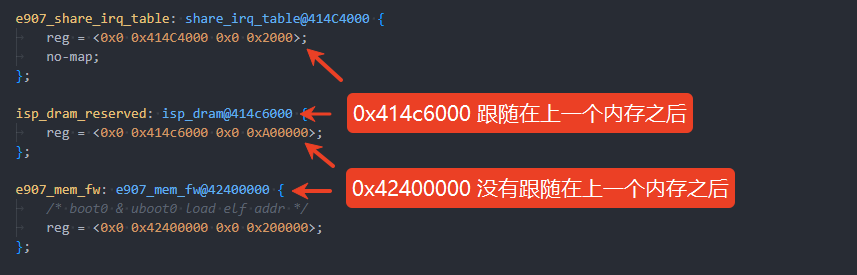
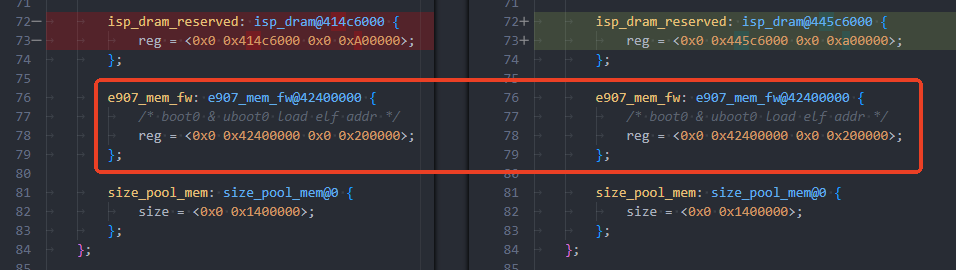
示例:RTOS 基地址调整到 0x44000000,大小调整为 0x500000 其他地址跟随修改
"amp_reserved_memory": {
	"memory_regions": [
		{
			"name": "e907_dram_reserved",
			"addr": "0x44000000",
			"size": "0x500000",
			"type": "independent"
		}
	]
}
修改效果如下图所示,可以看到原先连续的内存也跟随修改了,但是原先的独立内存 e907_mem_fw 没有跟随着一起修改
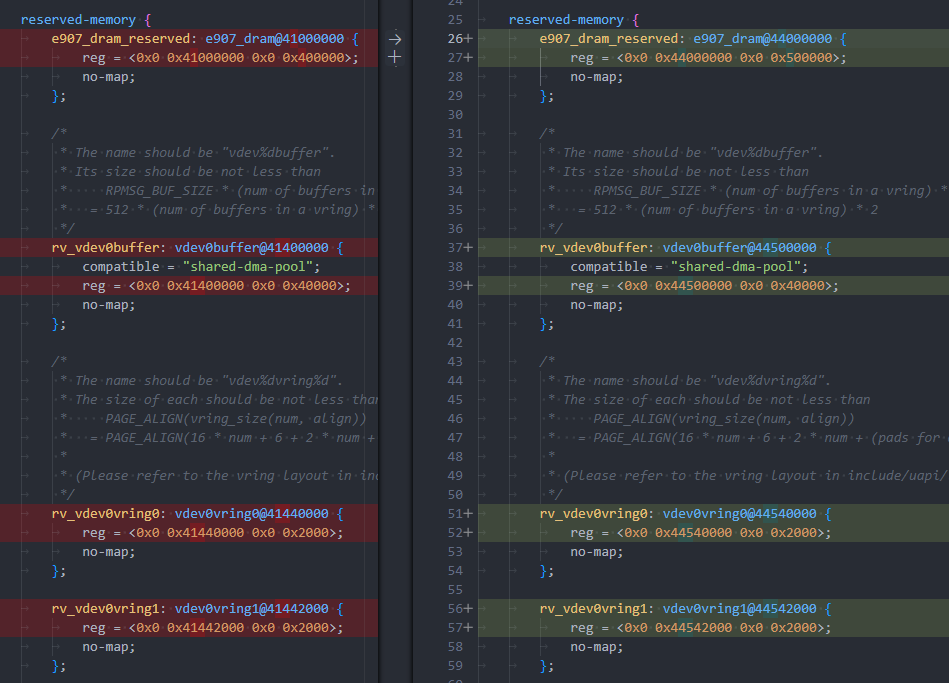
示例:RTOS 基地址调整到 0x44000000,大小调整为 0x500000 其他地址维持原样,不跟随修改
"amp_reserved_memory": {
	"memory_regions": [
		{
			"name": "e907_dram_reserved",
			"addr": "0x44000000",
			"size": "0x500000",
			"type": "independent"
		},
		{
			"name": "rv_vdev0buffer",
			"type": "independent"
		}
	]
}
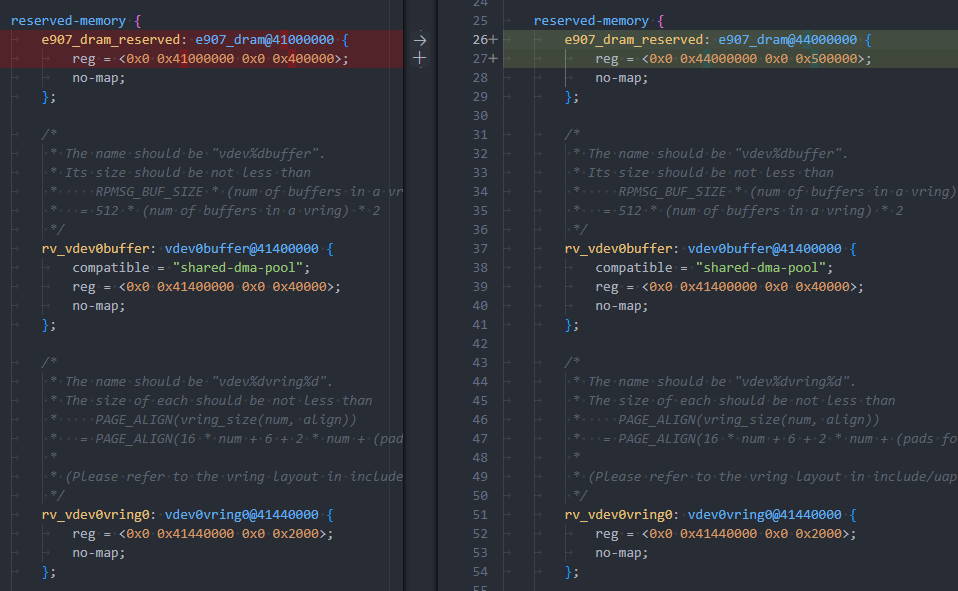
修改效果如下图所示,可以看到只有 e907_dram_reserved 的地址有修改,其他原先跟随在后面的内存因为 rv_vdev0buffer 成为了新的 independent,所以并没有一并修改。
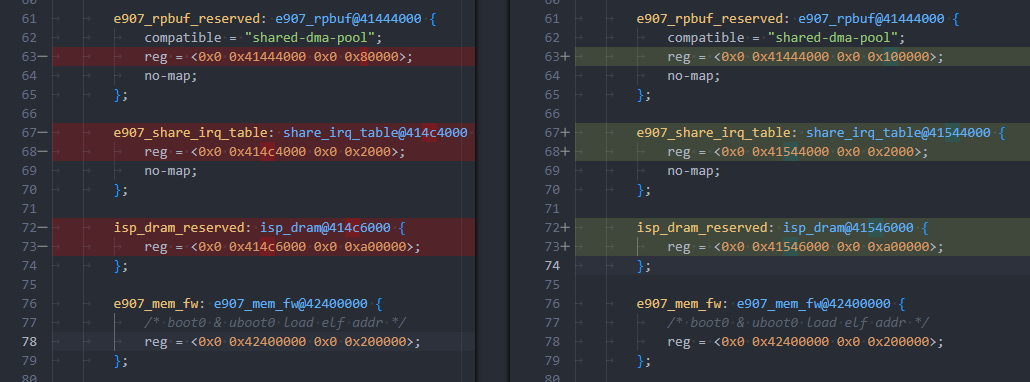
示例:RTOS 通讯 e907_rpbuf_reserved 的大小调整为 0x100000 ,其他地址有冲突的自动修改,没冲突则不修改
"amp_reserved_memory": {
	"memory_regions": [
		{
			"name": "e907_rpbuf_reserved",
			"size": "0x100000",
			"type": "follow_prev"
		}
	]
}
修改效果如下图所示,可以看到只有 e907_rpbuf_reserved 的大小有修改,并且后面有冲突的地址也自动往后挪了,没受影响的地址则不动
kernel_config_link 和 rtos_config_link
kernel_config_link 和 rtos_config_link 是用于同步修改的内核配置项的功能,有一些参数是需要内核或者 RTOS 配置的,这些参数则通过 xxx_config_link 方式同步配置。其参数含义如下:
- name:当出现修改,需要同步的内存的名字
- link:在 defconfig 中的配置项的字符串
- type:同步方式
- address_start:将此块内存的起始地址同步到给定的配置项
- size_hex:将此块内存的大小同步到给定的配置项
- start_address_offset:将此块内存的起始地址加上给定的 offset 大小后同步到给定的配置项
- end_address_offset:将此块内存的结束地址减去给定的 offset 大小后同步到给定的配置项
- offset:配置内存自动计算偏移,当同步方式为
start_address_offset或end_address_offset时才有用
提示
xxx_config_link 并不需要 memory_regions 给定修改才会同步,只要 memory_regions 的内存影响到 xxx_config_link 中的预留内存,则也会一并同步修改
:::
"amp_reserved_memory": {
	"memory_regions": [
		{
			"name": "e907_dram_reserved",
			"addr": "0x41000000",
			"size": "0x500000",
			"type": "independent"
		},
		{
			"name": "e907_rpbuf_reserved",
			"size": "0x100000",
			"type": "follow_prev"
		}
	],
	"kernel_config_link": [
		{
			"name": "isp_dram_reserved",
			"type": "end_address_offset",
			"link": "CONFIG_VIN_SENSOR_RESERVE_ADDR",
			"offset": "0x2000"
		}
	],
	"rtos_config_link": [
		{
			"name": "e907_dram_reserved",
			"type": "address_start",
			"link": "CONFIG_ARCH_START_ADDRESS"
		},
		{
			"name": "e907_dram_reserved",
			"type": "size_hex",
			"link": "CONFIG_ARCH_MEM_LENGTH"
		},
		{
			"name": "isp_dram_reserved",
			"type": "address_start",
			"link": "CONFIG_ISP_MEMRESERVE_ADDR"
		},
		{
			"name": "isp_dram_reserved",
			"type": "size_hex",
			"link": "CONFIG_ISP_MEMRESERVE_LEN"
		},
		{
			"name": "e907_rpbuf_reserved",
			"type": "address_start",
			"link": "CONFIG_COMPONENTS_RPBUF_RESERVED_MEM_ADDR"
		},
		{
			"name": "e907_rpbuf_reserved",
			"type": "size_hex",
			"link": "CONFIG_COMPONENTS_RPBUF_RESERVED_MEM_SIZE"
		}
	]
},